Write the standard. Take it to the floor. Prove the work.
Turn what your people know into clear procedures — then put them to work as maintenance tasks, followed on a mobile device and proven step by step.
Written to be filed. Not to be followed.
Most SOPs exist, but they don’t reach the people who need them, when they need them. Three things get in the way.
Text-heavy and hard to follow
Pages of dense text are difficult for workers to comprehend, especially in the middle of a task, on a noisy floor, with their hands full.
A complex way to produce one
Someone documents it. It goes to a design or CAD team to make it look good. Then it is printed. A long chain, just to get one procedure onto paper.
Stored in the office, not on the floor
SOP documents sit in files and folders in the office. When a worker needs the procedure at the machine, it simply isn’t there.
Make the SOP visual.
Image-based, not text-heavy. The SOP module renders every procedure beautifully, to your company’s template, with the real equipment and the steps shown as pictures that workers understand at a glance.
- dashboard_customizeSet the template onceYour company’s look and layout, created one time. AI can help you build it.
- auto_awesome_mosaicEvery SOP renders to itNo design team, no CAD, no waiting. Each approved procedure comes out looking right.
- qr_code_2Scan the QR code at the machineThe procedure is on the floor, on a phone or tablet, the moment it is needed.
Wear job specific PPE. Follow relevant PTW SOP as per risk analysis. Use Hasp or follow group LOTO policy in case of multiple workers. Always isolate respective MCB or SWITCH of while working on it. Ensure coolant water must be isolated before attempting the maintenance

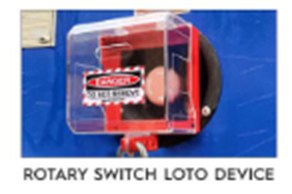
2. Use a pad lock and tag.

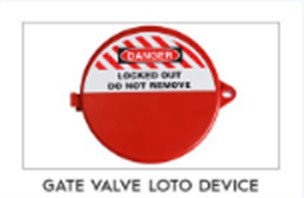
2. Use the valve LOTO device.
3. Put a pad lock and tag.
From requirement to SOP.
Turn what your people know into clear, actionable procedures. An SOP can start with a requirement, a task, a machine, a hazard or simply the knowledge of an experienced person. FactoryOS can use AI to generate the complete initial SOP from that requirement.
Generate with AI
The complete initial SOP, created from the requirement.
Refine with AI or by hand
Your team improves the draft with AI, or edits it manually.
Add what makes it real
Actual equipment images, step-by-step instructions, hazards and relevant LOTO requirements.
Create faster. Refine with expertise. Build procedures around the way work is actually done.
Build it where the work happens.
Take SOP creation beyond the office. Users can build and refine procedures directly from a mobile device or tablet — and create the procedure around the real workplace.
Capture the actual equipment
Take images of the real machine, right where it stands.
Add instructions step by step
Build the procedure in the order the work is done.
Bring in hazards and LOTO devices
Relevant predefined hazards and LOTO devices go straight into the SOP, connecting the task with the controls needed to do it safely.
Turn shop-floor knowledge into a standard that others can follow.

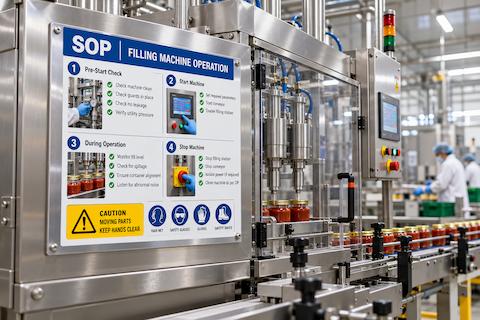
One SOP. Ready everywhere.
Make the approved procedure available wherever the work happens. Once completed and approved, the SOP is rendered into a structured, ready-to-use document.
One reference point for everyone.
The same approved procedure is read at a workstation, opened during maintenance, or used as a printed copy on the shop floor — so everyone works from the same standard.
Turn SOPs into maintenance tasks.
Don’t just store the procedure. Put it to work. Maintenance teams use approved SOPs as step-by-step working instructions — and execution is connected with accountability.
- assignment_ind01
Assign
Give the task to the right person.
- event02
Schedule
Set when it needs to happen.
- play_circle03
Execute
The technician follows the procedure directly from a mobile device or tablet.
- add_task04
Capture proof
Proof of execution is added against the relevant steps as the work is done.
- verified05
Review and approve
Supervisors monitor progress, review what was completed and approve the work.
The worker doesn’t have to remember the sequence or search for the right document. The procedure is already there, at the point of work.
A clear connection between what the organisation defined, what the worker performed and what the supervisor verified.
The SOP module is built for LOTO too.
Lockout / tagout procedures are SOPs that have to be exactly right. So the SOP module has LOTO built in: hazards, locking devices, the method of application and the method of verification, all ready to use. An equipment-specific LOTO procedure takes shape step by step, without starting from a blank page.
From the same procedure you get the sheet that goes on the machine, and the task that people work through when they isolate it. For the policy, assessment, roles and training around it, see our LOTO program.
Generate it step by step
Build the procedure in the SOP builder, with photos of the actual machine. The LOTO elements are already there to pick from, so nobody starts from a blank page.
Print it. Stick it on the machine.
The approved procedure is rendered into a clean, printable LOTO sheet, ready to display at the machine it belongs to.
Execute it and prove it
The same procedure opens as a step-by-step task for LOTO execution on a mobile device or tablet. Proof of execution is entered against the steps and goes for approval.
From a document in the office to a procedure at the machine.
The usual way
- close
Pages of text that workers struggle to follow - close
Documented, then sent to a design or CAD team, then printed - close
Kept in the office, away from the machine - close
Not there when the worker needs it
With FactoryOS SOPs
- check
Visual, image-based steps that are understood at a glance - check
Rendered to your company template, with AI to help set it up once - check
A QR code at the machine opens the procedure - check
On the floor, at the point of work, whenever it is required
Close the gap between knowledge and action.
From requirement to procedure. From procedure to execution. From execution to proof. FactoryOS helps organisations move critical knowledge from the office to the last-mile worker — making procedures easier to create, easier to access and easier to follow.
Write the standard. Take it to the floor. Prove the work.